
Visual feedback for live websites, pinned in place.
Drop a pin, box, arrow or highlight on any element of a real website or PDF, leave a comment, and let AI catch what you miss: design, content, SEO and accessibility.
PinPoint is completely free while we're in early access, no card, no time limit. You get up to 100 projects, 20 members and 20 guests with the full AI Auto-QA suite. Lock in early and enjoy everything on us. Paid plans arrive later , early-bird accounts will get plenty of notice.
Built for
Website feedback dies in translation
Static screenshots and vague emails turn simple fixes into multi-day scavenger hunts.
“Can you move the thing on the left a bit? You know the one.”
“Attached: screenshot_final_v3_REAL.png”
“Wait, is this fixed on mobile too?”
There is a better way
Meet Pip, the AI agent that reviews your site for you
Pip is an AI agent that never gets tired
Point Pip at a live URL or drop in a PDF. Pip leads five specialist agents that review your site in one pass, each inspects a different layer and pins what it finds to the exact element, in plain language, with a suggested fix.
Free for early birds, no card needed.
Specialist agents
AI Auto-QA
Branding, images, content, SEO, UI and UX, the generalist sweep across the whole page.
Accessibility (WCAG)
Contrast, alt text, tap targets, keyboard flow and screen readers, pinned on the exact element.
CTR & Conversion
Weak CTAs, funnel leaks and broken conversion links that quietly cost you signups.
Page Optimization
Performance and technical SEO, judged on the rendered page users actually see.
PDF Review
Document quality and structure, page by page, with pins inside the file itself.
Logo lockup shrinks below 24px on scroll
Two H1 tags found on the hero section
“Get a qoute”, typo in primary CTA
Tap target 32×32px, below the 44px minimum
0
Branding
0
SEO
0
UI & UX
0
Accessibility
Every AI finding lands as a real pin on the real element, with the pain point and the suggested fix written in plain English.
It pins, it does not just summarise
Every finding lands as a real pin on the real element, written as Good, Pain and Suggestion, the format people actually read.
Scores you can ship against
A live 0–100 score per category that climbs as you resolve pins, with a Must-fix tier that surfaces the serious issues first.
Reads the rendered page, not just code
A deterministic audit catches what is always wrong when it's wrong: broken links, missing alt text, low contrast, tiny tap targets, horizontal overflow.
Honest, and 20× faster than a human
A full sweep takes minutes, not the hours a manual review burns. Context-aware too: no invented problems on a good page, deeper digging on a weak one.
Match a design you love
Paste the URL of a page you admire or upload a PNG, add a note like “love their calm spacing”, and save it as your reference. PinPoint pins exactly where your page could improve to match its layout, spacing and style. Adapted to your brand, never copied.
Paste a URL or upload a PNG, free for early birds.
Reference vs your page
Visual parity analysis
“Your hero stacks four sizes in 90px. The reference uses two, with 32px rhythm. Drop the sub-label and raise line-height to 1.4.”
Point at the pixel. Say the thing.
PinPoint opens your real, live website and lets anyone mark it up. No plugins, no ambiguity, no “which button did you mean”.
Anchored to the element
Pins attach to the real DOM element, not a screenshot. They stay glued through scroll, resize and reflow.
Five annotation tools
Point pin, rectangle box, circle, arrow and text highlight, with a custom comment cursor.
Browse vs Comment mode
Browse hides every pin and lets clicks pass through, so you can navigate the real site, then flip back to Comment.
Rich threads, files and voice
Bold, italic, lists and links, plus image attachments with a lightbox and recorded voice notes on any reply.
Triage built in
Priority (low to urgent), assignees, day-relative due dates, resolve and reopen, filters and a progress bar.
PDFs too
Upload a PDF and review it page by page with the same pins, shapes and threads.

Pain point
Contrast ratio is 2.4:1 on this call-to-action button.
Turn findings into conversations
Sarah (UX)
This contrast issue is blocking the accessibility audit.Leo (Dev)
Fixing now, pushing the theme update.No API keys. No setup. It just runs.
We manage the AI for you, there's no key to create, nothing to connect, and no separate AI bill. Sign up and run your first QA in minutes. Every review spends simple credits priced from the real cost of the run, and each agent ships set to Auto, a balanced model we pick for you. Want control? Choose a specific model per agent anytime. Early birds run everything free.
Free for early birds, no card, no keys.
4,500
Allocated credits
2,759
Used credits
1,754
Available credits
Support that already knows your project
Pip is the assistant in every workspace. Ask it anything, it looks at your real project state and answers with evidence, and when it counts, a real technician steps in.
Answers with evidence
Pip checks your real project state, verification, reviews, scores, pins, and answers about your workspace, not a canned FAQ.
Hands you to a human
Need a person? Pip opens a ticket and hands you to the team with full context, so you never repeat yourself.
One ticket, always in sync
Come back later and it picks up right where you left off. Priority, ratings and email updates on every ticket.
Free for early birds.
Pip
Workspace assistant · online
Review together, in the same second
PinPoint is multiplayer. Pins, replies and resolutions appear for everyone instantly, with initials and colours so you always know who said what.
Live cursors and presence
Teammates move across the page in real time, each with a name, colour and the resolution they are reviewing at.
Workspaces and roles
Owner, Admin and Editor members plus Commenter and Viewer guests, in as many workspaces as you need.
Invite in seconds
An email invite with an optional name and password, so a client is inside the project on their first click.
Everything in one place
PDF and website projects side by side, with global reports and usage across every workspace.
Invite the whole team in seconds.
Headline contrast fails AA, and the sign up button sits below the fold on mobile.
Raj resolved pin #12, everyone sees it instantly
Just nowFrom vague feedback to shipped fix in three steps
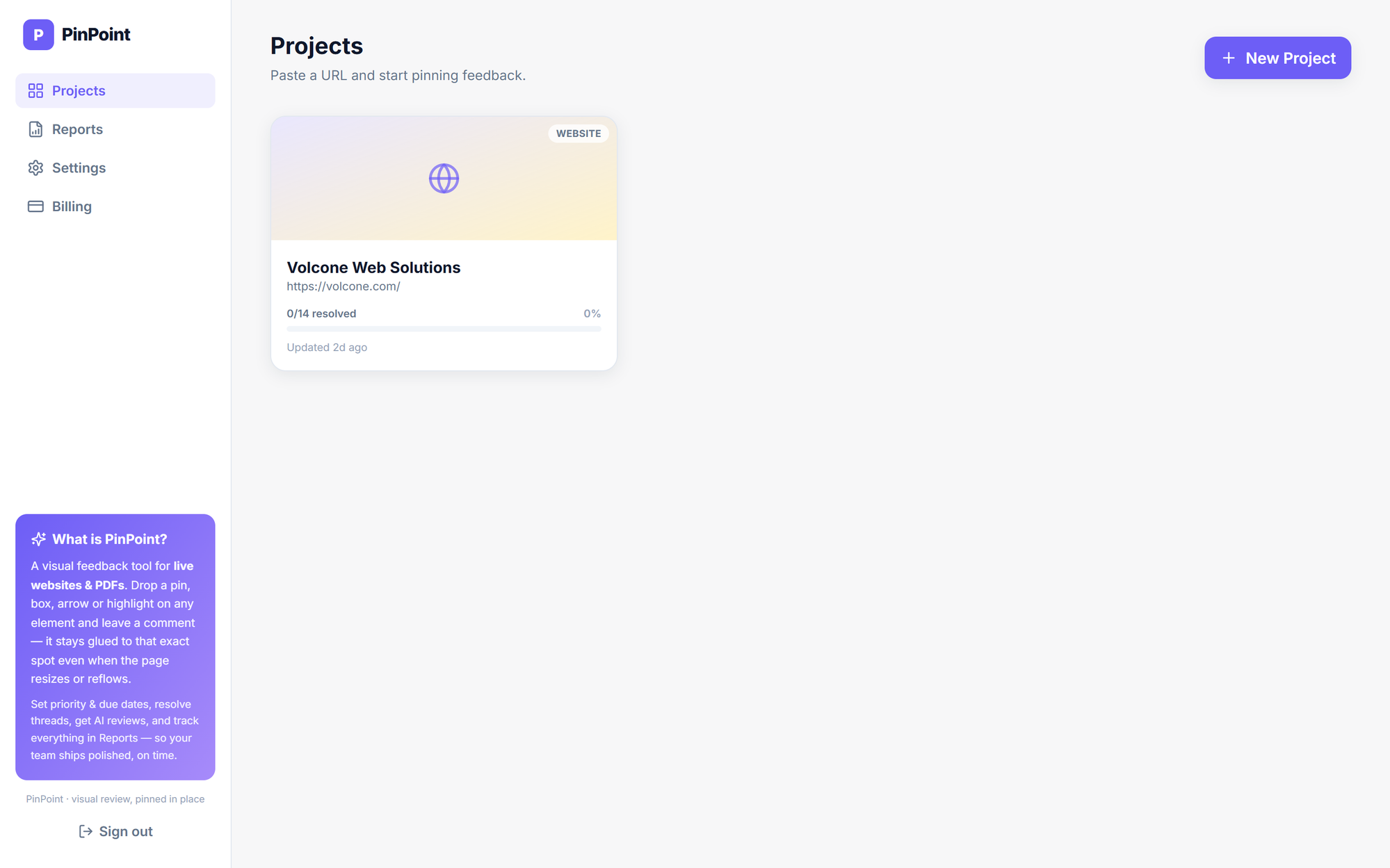
Create the project and verify your domain
Paste a URL or upload a PDF, then prove ownership once with a DNS TXT record or a meta tag.
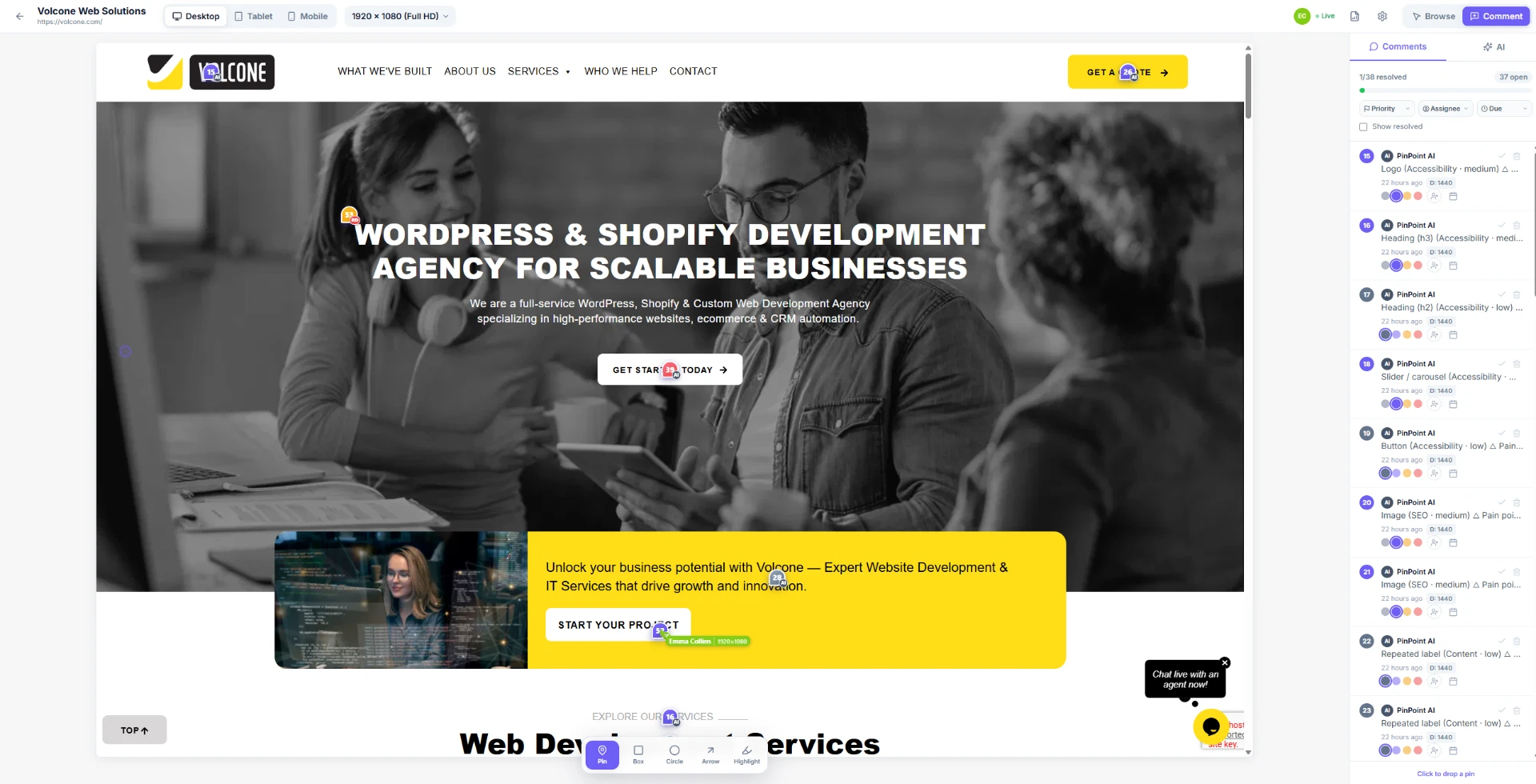
Generate screenshots and run Auto-QA
Capture Desktop, Tablet and Mobile, then let Pip pin issues while you add your own notes.
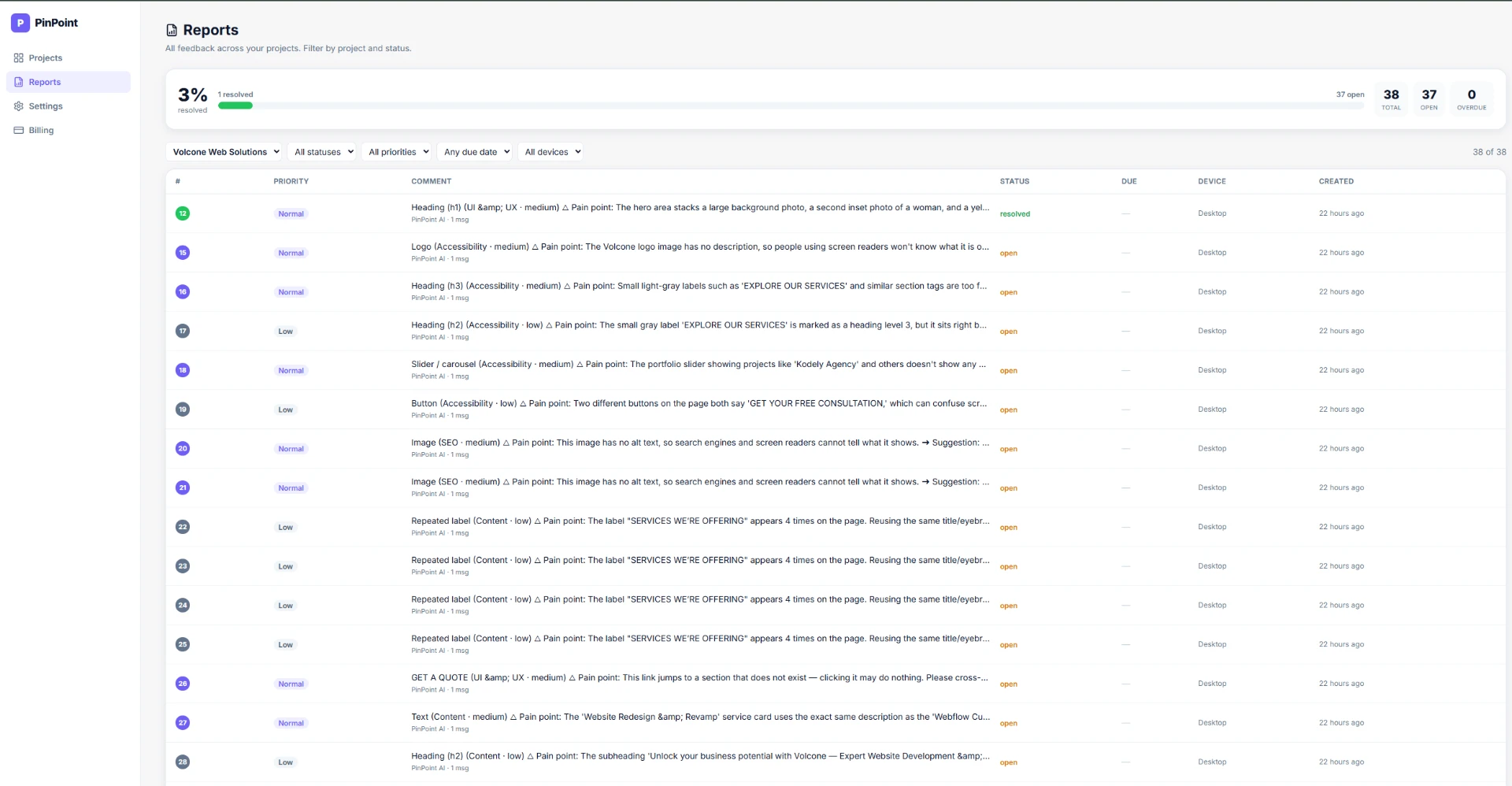
Resolve and track in Reports
Assign, prioritise, resolve, and watch progress across every project in one filterable table.
Free for early birds, no card needed.
Every open issue, across every project
One table for the whole workspace: filter by project, status, priority, due date and device, and watch the resolved percentage climb.
One table for the whole workspace.
Desktop, tablet and mobile from one place
Switch device and resolution presets and the pins re-anchor automatically. Every comment carries the screen it was raised on, like “D: 1920”.
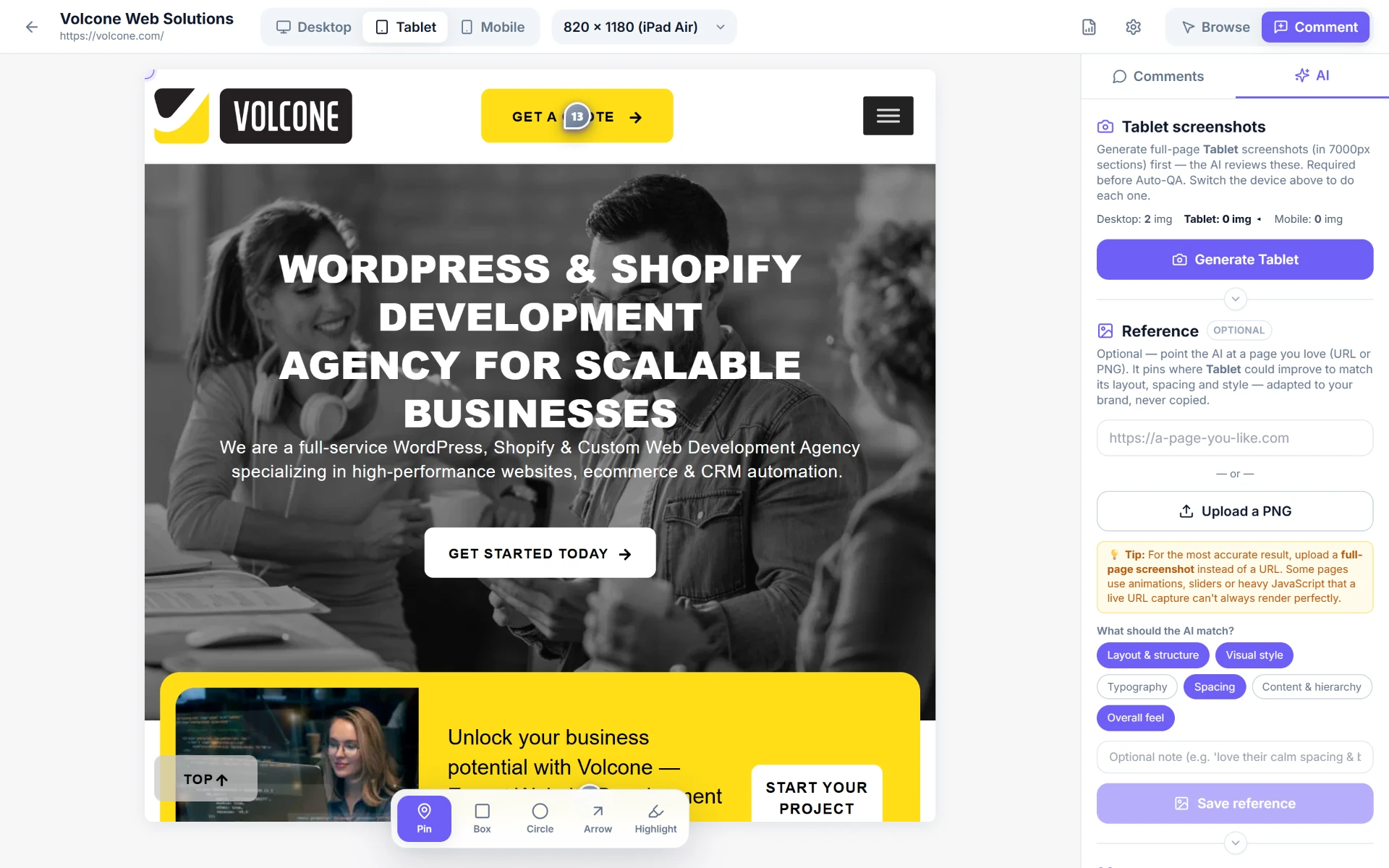
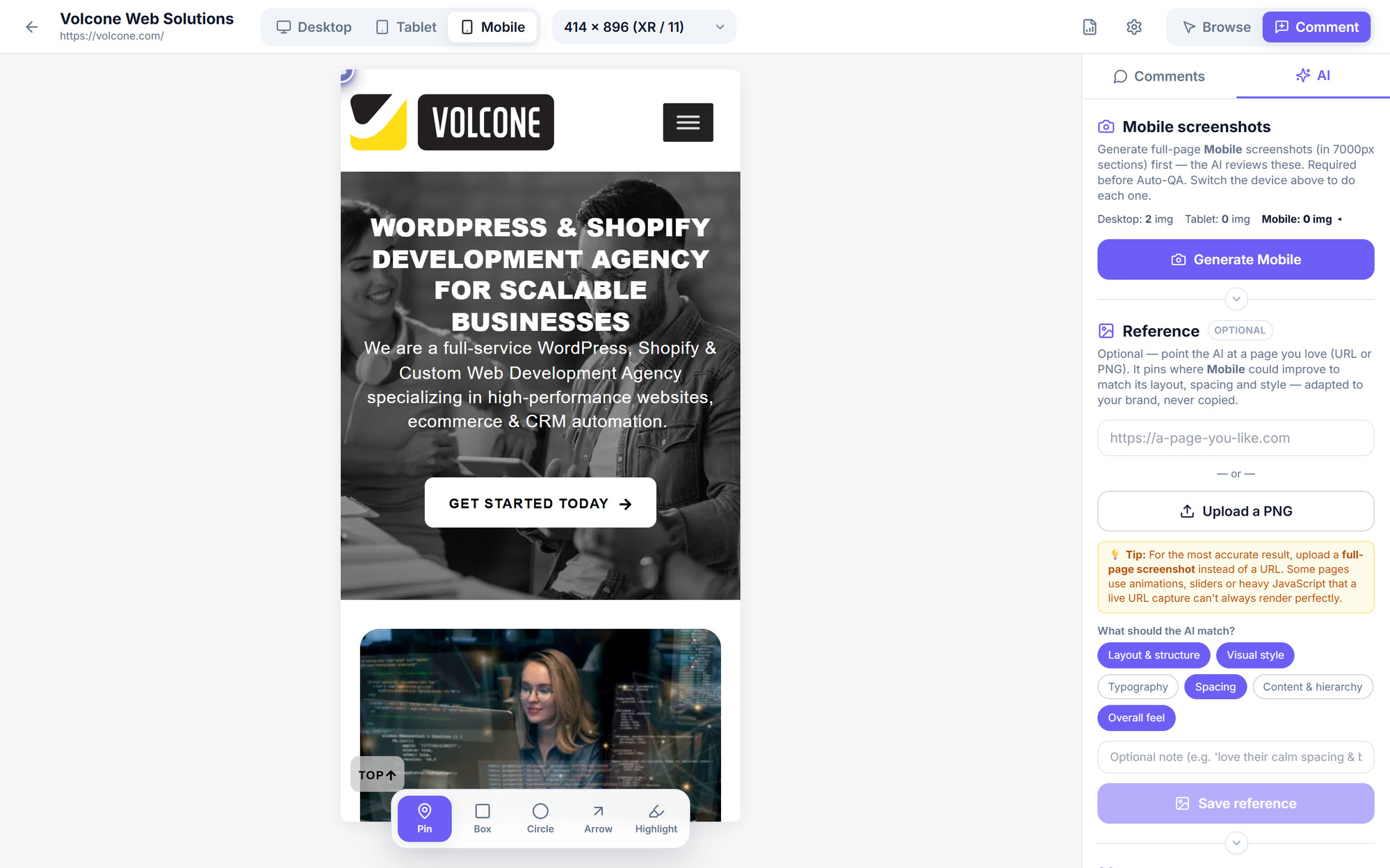
Desktop, tablet and mobile covered.
Built for everyone who reviews pixels
Web agencies
Run client review rounds on a single link. Guests comment without an onboarding call.
Freelancers
Polish before launch. Catch broken links, contrast issues and typos the client would have found.
Product & marketing teams
QA every release across breakpoints and keep the trail in Reports.